Showing posts with label monochrome. Show all posts

365 Challenge #265 - Black & White Conversions

I'm still working my way through Scott Kelby's book, The Adobe Photoshop CS5 Book for Digital Photographers. It's so helpful! I've been reading about HDR, and all manner of retouching in Photoshop. There are a few pages dedicated to the conversion of raw files to black and white, and I'm really liking Mr Kelby's step by step style.

As I've realised recently, there are about a million shades of gray, which is what you're dealing with in a black and white photo. It's all about the contrasts between variations of gray.

What I love about Kelby's books, is their simplicity - he uses a lot of words to get across each concept, but ultimately, the books are really easy to follow, particularly when you're using your own photos to work through the steps.


The image(s) above are an example of converting a RAW image to black and white, using one of Scott Kelby's "recipes".

Basically, he does much of his processing in Camera Raw, because it's easy to do there. Gotta love that!

Basically, the steps he goes through to achieve a high contrast B/W conversion like this one are as follows:
  • Click on the HSL/Grayscale icon (the 4th icon on the left in the main Camera Raw menu).
  • Go back to the first Camera Raw editing tab and crank up to your exposure as high as it will go just until you start clipping the highlights (the book gives pictures here, which make it much easier to follow).
  • Crank up the blacks, by dragging the Blacks slider to the right until it looks really contrasty.
  • Go to the Tone Panel Curve and choose Strong Contrast from the pop up menu - or otherwise, just drag the Contrast slider to the right until the image looks really contrasty.
  • Then, increase the Clarity to about 75 (or 25 for a portrait, or 0 for a baby, says Kelby)
  • And that should be that!
Ok, so it might be a bit too high contrasty for your liking, but for a day where the skies were completely blown out and blah (like in my image), I reckon blow them out and focus on the detail elsewhere in the image.

What's your favourite black & white conversion technique?

Gangsters at Teneriffe - Film Noir, Woolstore Style

The boyz at Creative Photo Workshops arranged a funky Film Noir shoot in Brisbane last night, which provided a dramatic contrast between the wedding workshop earlier in the day. From romantic, intimate couple shots, we moved into the dark and moody world of gangsters, guns and scorned lovers.

The historic Mactaggarts Woolstore at Teneriffe provided the perfect scene for a multitude of sins and crimes - and that was just Shelton's singing!

Even though it was a "fun shoot", there was oodles to learn. Like how to effectively use available light such as down lights and street lights. I've walked past this particular pole in the complex hundreds of times, but I'd never have envisaged sticking a guy with a trenchcoat, fedora and gun under it, and shooting in monochrome with the contrast bumped up (in camera). No flash, just an average shutter speed and a bit of attitude.

The boys bought a portable smoke machine, which is one of the most fun props on the planet. They also bought an arsenal of lights which provided extra contrast and awesome rim lighting opportunities - all techniques that I see could be used in other shooting situations. Of course, our awesome models, Rob, Emma and Felicity made the shots, by keeping in costume and character, during what must have been some long and uncomfortable poses.


As I'd learnt in the wedding workshop, you can create some pretty awesome images that do not depend on having an awesome location. The shot below was taken in a courtyard I walk past every day, but with some contrast and shadow, smoke and strong characters, you'd never know where it was being shot.


The Film Noir workshop gave me yet more things to think about in terms of photography. I loved it, because I love black and white photos, but it also provided yet another lesson about the importance of light, and posing people for the light. Ultimately, it was also a really fun night - and that's what it's all about.

My mind is on overload with the possibilities of what I'm learning at the moment. In the mean time, I'm off to buy a smoke machine.

Me & Monochrome

I love black and white photos - always have. I love the moodiness and drama that monochrome can create from an otherwise blah shot, particularly when there are clouds like in the series below. I personally find black and white conversions a great way to handle tricky lighting situations such as screamingly glary days. While I should probably learn how to better handle tricky lighting situations, I'm happy to keep playing with good ole black and white.

I took these shots yesterday at about midday under the hot sun on Red Beach, Bribie Island. In the first one, I've bumped down the clarity to give the water a blurred effect, and in the seond image, I've bumped up the contrast and sharpness. 


365 Challenge #213 - Getting used to the new accessories...

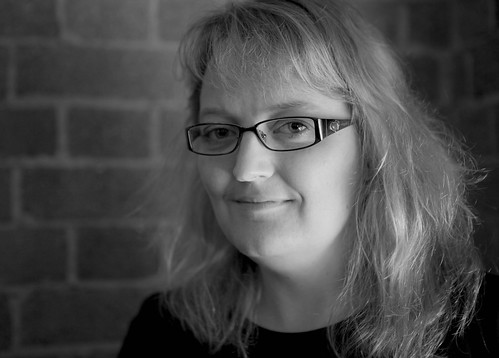
With the endless %#*&^(! rain in Brisbane this weekend, I've been apartment-bound and itching to use the camera. Decided to take a few pics of moi, using the tripod, cable release, and natural light from my main window, diffused slightly by upturned wooden blinds.

My parents, who are travelling at the moment, wanted me to send a pic of me wearing my new specs. I'm still getting used to lenses of this variety...L-series, of course!

So, as I get used to my visible signs of aging, I hope you're enjoying your weekend :)

Nothing beats Sydney Harbour under sun!


Sydney, originally uploaded by Melanie Surplice.
I'm biased. Sydney is my home town and I reckon it's up there with the most beautiful cities in the world. Even in monochrome!

I took this pic last month during a frantic few days at the Sydney Convention and Exhibition Centre for a tradeshow. What's not to love about this place!

Where's your favourite city?